
Turn on suggestions
Auto-suggest helps you quickly narrow down your search results by suggesting possible matches as you type.
Showing results for
Please log in to access translation
Turn on suggestions
Auto-suggest helps you quickly narrow down your search results by suggesting possible matches as you type.
Showing results for
The PTC Community is on temporary read only status in preparation for moving our community to a new platform. Learn more here
- Community
- Creo+ and Creo Parametric
- 3D Part & Assembly Design
- Re: Getting Harness (Wire or Cable) in Shrink Wrap
Translate the entire conversation x
Please log in to access translation
Options
- Subscribe to RSS Feed
- Mark Topic as New
- Mark Topic as Read
- Float this Topic for Current User
- Bookmark
- Subscribe
- Mute
- Printer Friendly Page
Getting Harness (Wire or Cable) in Shrink Wrap


May 05, 2017
08:10 AM
- Mark as New
- Bookmark
- Subscribe
- Mute
- Subscribe to RSS Feed
- Permalink
- Notify Moderator
Please log in to access translation
May 05, 2017
08:10 AM
Getting Harness (Wire or Cable) in Shrink Wrap
While creating shrink wrap for large assemblies, particularly harness geometry is missing in the Shrink wrap. Only the connectors and terminals are there, harness routing is not there.
Is there any way of getting that in shrink wrap?
Solved! Go to Solution.
Labels:
- Labels:
-
Assembly Design
ACCEPTED SOLUTION
Accepted Solutions


May 09, 2017
10:57 AM
- Mark as New
- Bookmark
- Subscribe
- Mute
- Subscribe to RSS Feed
- Permalink
- Notify Moderator
Please log in to access translation
May 09, 2017
10:57 AM
It is not the easiest process. But you would need to export the harness assembly as a IGES or VRML file. Then import this file back in to Creo as solid geometry to create a shrinkwrap model.
I hope this information helps you.
3 REPLIES 3
May 09, 2017
10:57 AM
- Mark as New
- Bookmark
- Subscribe
- Mute
- Subscribe to RSS Feed
- Permalink
- Notify Moderator
Please log in to access translation
May 09, 2017
10:57 AM
It is not the easiest process. But you would need to export the harness assembly as a IGES or VRML file. Then import this file back in to Creo as solid geometry to create a shrinkwrap model.
I hope this information helps you.
May 26, 2017
08:04 AM
- Mark as New
- Bookmark
- Subscribe
- Mute
- Subscribe to RSS Feed
- Permalink
- Notify Moderator
Please log in to access translation
May 26, 2017
08:04 AM
Tried exporting to IGES & VRML, Still shrinkwrap fails and not creating the geometry.

Jun 12, 2017
08:54 AM
- Mark as New
- Bookmark
- Subscribe
- Mute
- Subscribe to RSS Feed
- Permalink
- Notify Moderator
Please log in to access translation
Jun 12, 2017
08:54 AM
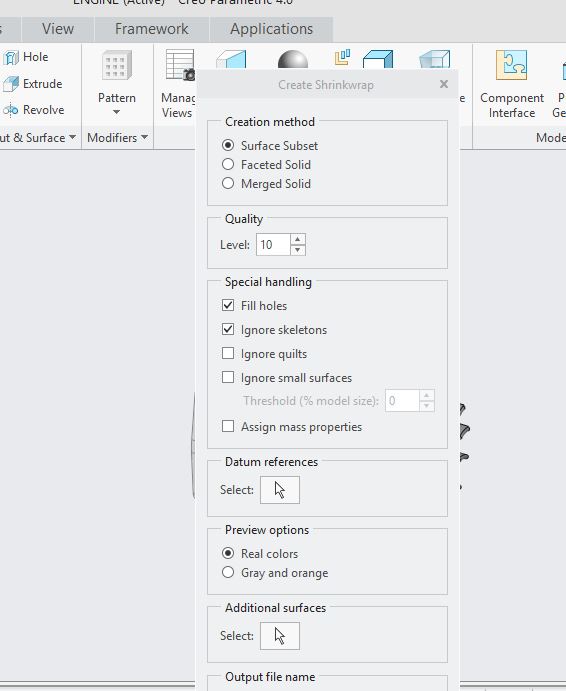 file> save as > shrinkwrap> shrink export window will appear increase quality level or use merged solid and also increase quality ..I think it can solve your problem.


