Turn on suggestions
Auto-suggest helps you quickly narrow down your search results by suggesting possible matches as you type.
Showing results for
Please log in to access translation
Turn on suggestions
Auto-suggest helps you quickly narrow down your search results by suggesting possible matches as you type.
Showing results for
The PTC Community is on temporary read only status in preparation for moving our community to a new platform. Learn more here
- Community
- Creo+ and Creo Parametric
- 3D Part & Assembly Design
- Re: Hidden Line for tapped hole
Translate the entire conversation x
Please log in to access translation
Options
- Subscribe to RSS Feed
- Mark Topic as New
- Mark Topic as Read
- Float this Topic for Current User
- Bookmark
- Subscribe
- Mute
- Printer Friendly Page
Hidden Line for tapped hole


Feb 07, 2020
12:26 PM
- Mark as New
- Bookmark
- Subscribe
- Mute
- Subscribe to RSS Feed
- Permalink
- Notify Moderator
Please log in to access translation
Feb 07, 2020
12:26 PM
Hidden Line for tapped hole
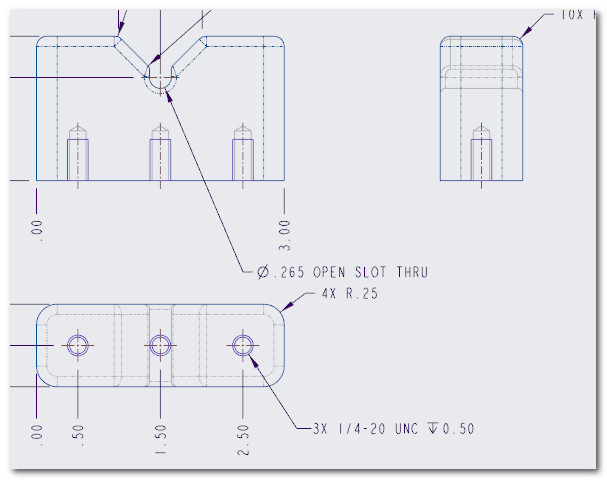
I've added a cosmetic thread to a tapped hole in order for it to show up in my drawing. However it shows up in my drawing as two solid line circles when the inner circle should be solid line and the outer circle should be a hidden line. How can I get the outer circle to show up as a hidden line circle?
Labels:
- Labels:
-
2D Drawing
2 REPLIES 2


Feb 11, 2020
11:27 AM
- Mark as New
- Bookmark
- Subscribe
- Mute
- Subscribe to RSS Feed
- Permalink
- Notify Moderator
Please log in to access translation
Feb 11, 2020
05:06 PM
- Mark as New
- Bookmark
- Subscribe
- Mute
- Subscribe to RSS Feed
- Permalink
- Notify Moderator
Please log in to access translation
Feb 11, 2020
05:06 PM
I figured it out. The Creo drawing shows the tapped hole has two solid lines as shown in 2020-02-11_145918.jpg. However, when I saved the drawing as a PDF, the major diameter circle "prints" as a hidden line as shown in 2020-02-11_150132.jpg.