
Turn on suggestions
Auto-suggest helps you quickly narrow down your search results by suggesting possible matches as you type.
Showing results for
Please log in to access translation
Turn on suggestions
Auto-suggest helps you quickly narrow down your search results by suggesting possible matches as you type.
Showing results for
The PTC Community is on temporary read only status in preparation for moving our community to a new platform. Learn more here
- Community
- Creo+ and Creo Parametric
- 3D Part & Assembly Design
- dimension and annotations on drawing
Translate the entire conversation x
Please log in to access translation
Options
- Subscribe to RSS Feed
- Mark Topic as New
- Mark Topic as Read
- Float this Topic for Current User
- Bookmark
- Subscribe
- Mute
- Printer Friendly Page
dimension and annotations on drawing


Sep 22, 2015
05:34 PM
- Mark as New
- Bookmark
- Subscribe
- Mute
- Subscribe to RSS Feed
- Permalink
- Notify Moderator
Please log in to access translation
Sep 22, 2015
05:34 PM
dimension and annotations on drawing
new to creo 2.0. there is a couple of things i need some help with on drawing options
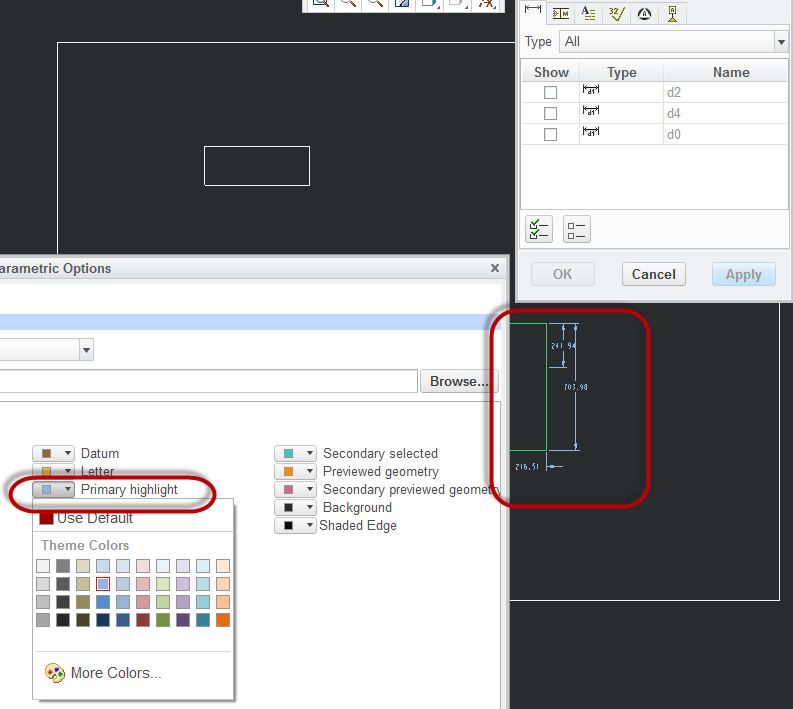
when i right click on a view, and show model annotations, all the annotations are dark red. my background is black, so they are hard to read which i want to keep. is there any way to change that red color to a lighter color?
This thread is inactive and closed by the PTC Community Management Team. If you would like to provide a reply and re-open this thread, please notify the moderator and reference the thread. You may also use "Start a topic" button to ask a new question. Please be sure to include what version of the PTC product you are using so another community member knowledgeable about your version may be able to assist.
Solved! Go to Solution.
Labels:
- Labels:
-
2D Drawing
ACCEPTED SOLUTION
Accepted Solutions


Sep 22, 2015
07:30 PM
- Mark as New
- Bookmark
- Subscribe
- Mute
- Subscribe to RSS Feed
- Permalink
- Notify Moderator
Please log in to access translation
Sep 22, 2015
07:30 PM
Daniel,
You may try changing the Primary Highlight color in system colors.
2 REPLIES 2
Sep 22, 2015
07:30 PM
- Mark as New
- Bookmark
- Subscribe
- Mute
- Subscribe to RSS Feed
- Permalink
- Notify Moderator
Please log in to access translation
Sep 22, 2015
07:30 PM
Daniel,
You may try changing the Primary Highlight color in system colors.
Sep 23, 2015
09:35 AM
- Mark as New
- Bookmark
- Subscribe
- Mute
- Subscribe to RSS Feed
- Permalink
- Notify Moderator
Please log in to access translation
Sep 23, 2015
09:35 AM
thank you very much..


