Turn on suggestions
Auto-suggest helps you quickly narrow down your search results by suggesting possible matches as you type.
Showing results for
Please log in to access translation
Turn on suggestions
Auto-suggest helps you quickly narrow down your search results by suggesting possible matches as you type.
Showing results for
The PTC Community is on temporary read only status in preparation for moving our community to a new platform. Learn more here
- Community
- Creo+ and Creo Parametric
- Customization
- Custom IFX Library
Translate the entire conversation x
Please log in to access translation
Options
- Subscribe to RSS Feed
- Mark Topic as New
- Mark Topic as Read
- Float this Topic for Current User
- Bookmark
- Subscribe
- Mute
- Printer Friendly Page
Custom IFX Library


Feb 23, 2026
08:54 AM
- Mark as New
- Bookmark
- Subscribe
- Mute
- Subscribe to RSS Feed
- Permalink
- Notify Moderator
Please log in to access translation
Feb 23, 2026
08:54 AM
Custom IFX Library
I would like to create a fastener library compatible with the IFX module.
First, I am trying to link an existing family table with the keyword FAMTABLE.
To do this, I have created a .dat file, as shown below
SCREWTYPE 1
UNIT MM
SURFACE 49
AXIS 82
CBSCR DIN974-1 R1
INFO <Screw_test>
!Enter the name of the Family Table Part
!---------------------------------------
FAMPRT VIS_CHC_INOX_JY
SYMBOL STRING DN LG B S DK K DG P
INSTANCE STRING DN LG B S DK K DG P
#FAMTAB M<DN> d4 d6 d15 d17 d5 d7 d16 @pas
My family table contains several instances using an item code for each instance.
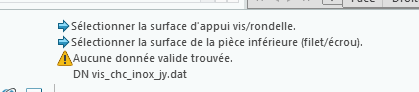
When I launch IFX, the thread box remains empty and I cannot choose a screw size.
I also get the following error message:
No valid data found
DN Vis_chc_inox_jy.dat
I think I have a problem with the STRING box in my .dat file.
I tried with a family table with two instances and simpler file names, but nothing changed.
I looked at all the posts, but none of them answered my question.
Could you please help me?
This is my first step. Next, I would like to link my tables, but in Windchill.
Creo 10
Labels:
- Labels:
-
Other
- Tags:
- family table
- ifx
10 REPLIES 10


Feb 24, 2026
03:05 AM
- Mark as New
- Bookmark
- Subscribe
- Mute
- Subscribe to RSS Feed
- Permalink
- Notify Moderator
Please log in to access translation
Feb 24, 2026
03:05 AM
Hi,
can you please attach your simple part and your *.dat file.
Then I will check it on my side and give you feedback.
Feb 24, 2026
03:27 AM
- Mark as New
- Bookmark
- Subscribe
- Mute
- Subscribe to RSS Feed
- Permalink
- Notify Moderator
Please log in to access translation
Feb 24, 2026
03:27 AM
Hi Oliver,
Thank you for your quick answer;
You will find attached our dat file and two differents prt files.
One is a test part with 2 instances and the other our official part family table
Best Regards
Jonathan
Feb 24, 2026
05:47 AM
- Mark as New
- Bookmark
- Subscribe
- Mute
- Subscribe to RSS Feed
- Permalink
- Notify Moderator
Please log in to access translation
Feb 24, 2026
05:47 AM
Hi,
you must use tabs between your values.
I also have changed @pas to PAS.

That's all.
Find attached the modified file.
Feb 24, 2026
05:50 AM
- Mark as New
- Bookmark
- Subscribe
- Mute
- Subscribe to RSS Feed
- Permalink
- Notify Moderator
Please log in to access translation
Feb 24, 2026
05:50 AM
Hi,
one more hint.
I recommend to use Notepad++ (Show tabs and spaces) together with plugin Columns++ (Elastic Tabstops)
Github: Columns++ plugin for Notepad++
Feb 26, 2026
05:57 AM
- Mark as New
- Bookmark
- Subscribe
- Mute
- Subscribe to RSS Feed
- Permalink
- Notify Moderator
Please log in to access translation
Feb 26, 2026
05:57 AM
Thank you Oliver!
For washer, does it work the same way with family table?
How does it match the size of screew and washer?
Is it preferable to make a family table by material and by size of washer (large, small, medium)?
Feb 27, 2026
01:14 AM
- Mark as New
- Bookmark
- Subscribe
- Mute
- Subscribe to RSS Feed
- Permalink
- Notify Moderator
Please log in to access translation
Feb 27, 2026
01:14 AM
Hi,
here we go.
For washer, does it work the same way with family table?
- Yes, same process as for screws and nuts.
How does it match the size of screew and washer?
- You need a dimension or parameter (DN) for the screw diameter
- if you only have inner and outer diameter it will not work
Is it preferable to make a family table by material and by size of washer (large, small, medium)?
- this is up to you.
- it depends on the rest of your library-structure - you should keep it consistent.
- you can use one *.dat file for each material or you can use a column with material und use SUBINFO to select the material/size after selection the washer
- Did you know about SUBINFO in IFX - PTC Community
- you can use a kind of filter inside your *.dat file to filter for material or size parameter
- Fastener Data Files - see MUST and NOT for family tables
Feb 27, 2026
03:35 AM
- Mark as New
- Bookmark
- Subscribe
- Mute
- Subscribe to RSS Feed
- Permalink
- Notify Moderator
Please log in to access translation
Feb 27, 2026
03:35 AM
Thank you,
Is it ok like that?
because it doesn't work.
I don't see washer and nut on the interface
Feb 27, 2026
04:06 AM
- Mark as New
- Bookmark
- Subscribe
- Mute
- Subscribe to RSS Feed
- Permalink
- Notify Moderator
Please log in to access translation
Feb 27, 2026
04:06 AM
Hi,
looks good from the png.
ensure you have a diameter (e.g. M6) availabe for the nut and washer,
if not, they will be removed and the option menu stays empty.
If I should verify it, please send your files (*.dat and *.prt).
You can also provide it to me by mail if you do not want to share it here.
Mar 04, 2026
07:28 AM
- Mark as New
- Bookmark
- Subscribe
- Mute
- Subscribe to RSS Feed
- Permalink
- Notify Moderator
Please log in to access translation
Mar 04, 2026
07:28 AM
Thank you for your help,
It works now! the # was missing
Is it a way to manage headless screews with IFX in tapped blind holes or tapped through holes in order to have automatic diameter selection? same question with pins?
Best Regards
Mar 13, 2026
02:36 AM
- Mark as New
- Bookmark
- Subscribe
- Mute
- Subscribe to RSS Feed
- Permalink
- Notify Moderator
Please log in to access translation
Mar 13, 2026
02:36 AM
Hi,
for setscrews you do not have the possibility to enter a offset depth to the placement surface.
So setscrews are not supported right now.
For dowelpins this is possible.
Please send me a little bit more details, then I can review your request.

Announcements


Top Tags